Beta Script
Here is a test script for installing and configuring RNS. It is still very beta.
How to use it.
- Download the file using wget and the link above
wget PASTEDLINK - Make the file executable
chmod +x setup_rns.sh - Run it with
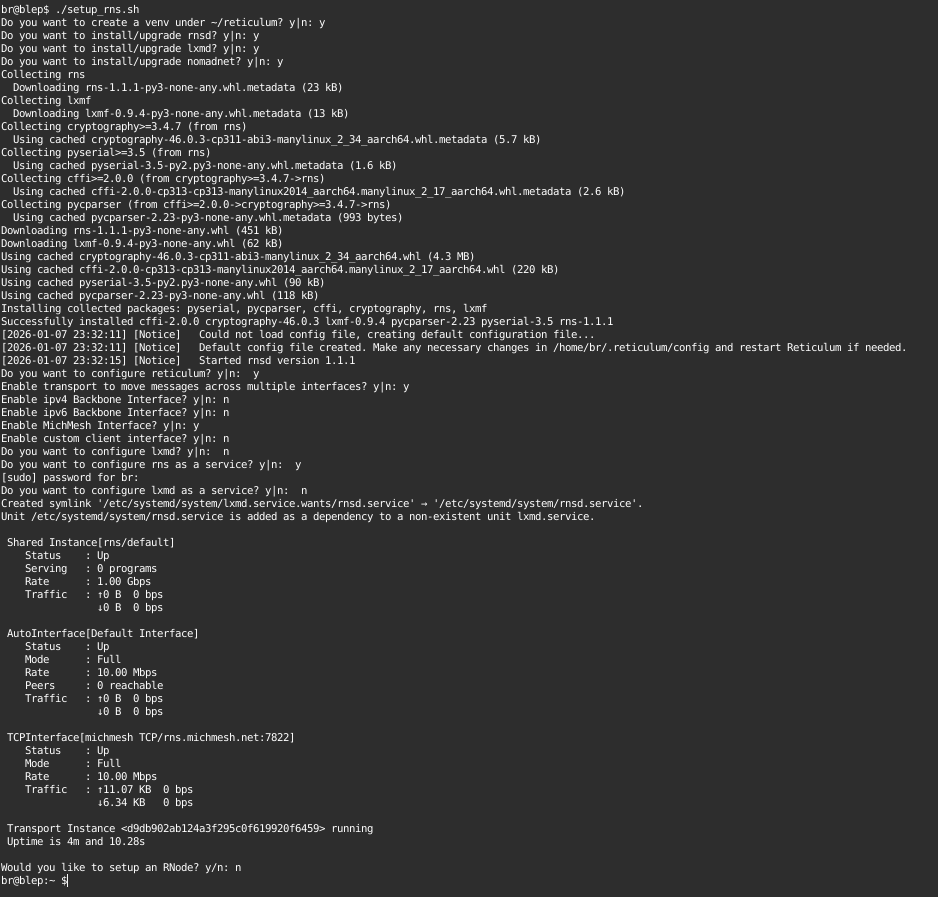
./setup_rns.sh. It will ask the following questions:
- Do you want to create a new python venv or use an existing. Unless you are really tight on space, create a new one - it will use around 350mb. We put it in a venv to isolate it from other python projects.
- Which services to you want to install.
- RNS is the base for everything else. If it is already installed, choose
n, otherwisey. - LXMD is the propagation server - this is what stores messages for later pickup when you are not around. You probably don't want to enable this if you are on a public testnet and running off an SD card.
- NomadNet is a text based interface as well as a web server equiv.
- It will now ask if you want to setup Reticulum. If yes, it will start the service to generate the config and identity, then kill the service. You will see an error here and that's ok.
- It will then ask if you want to enable transport mode. If enabled, this will act like a router or gateway between interfaces.
- It will then ask if you want to enable an ipv4 backbone interface - this is what you would want if you are going to host an external server like rns.michmesh.net. If you do this, it will ask which interface you want to attach to.
- It will then ask if you want to enable an ipv6 backbone. same as above.
- It will then ask if you want to create the MichMesh interface. This is a connection to the regional test net.
- It will then ask if you want to create your own tcp client to connect to another network. You will need to know the hostname or IP and port.
- It will then ask if you want to configure LXMD - the propagation server from above.
- It will then start the service to create the config and identity files. There will be a few errors here, they can usually be ignored.
- It will then ask if you want to be a propagation node. If so, it will then ask what you want to name your node.
- It will then ask if you want to enable RNS and LXMD systemctl.services. This will auto-start the services on boot.
- It will then ask if you want to deploy an RNode. If so, plug in a compatible device and hit enter. After that you will need to manually setup your config using our rnode config page or the reticulum interface page
How to uninstall after using the script.
- If you let is setup rns and lxmd services
sudo systemctl stop rnsd ; sudo systemctl stop lxmd; sudo systemctl disable rnsd; sudo systemctl disable lxmd - Clean up the install and config dirs
rm -rf ~/reticulum ~/.reticulum; test -d ~/.lxmd && rm -rf ~/.lxmd